

Sawblade Scratchpad
A quick way to generate and transform text strings, aimed at developers.
Key features
Whether you're a developer, IT professional, writer, or power user, Scratchpad puts common text utilities in a single, distraction-free tool.
Comprehensive
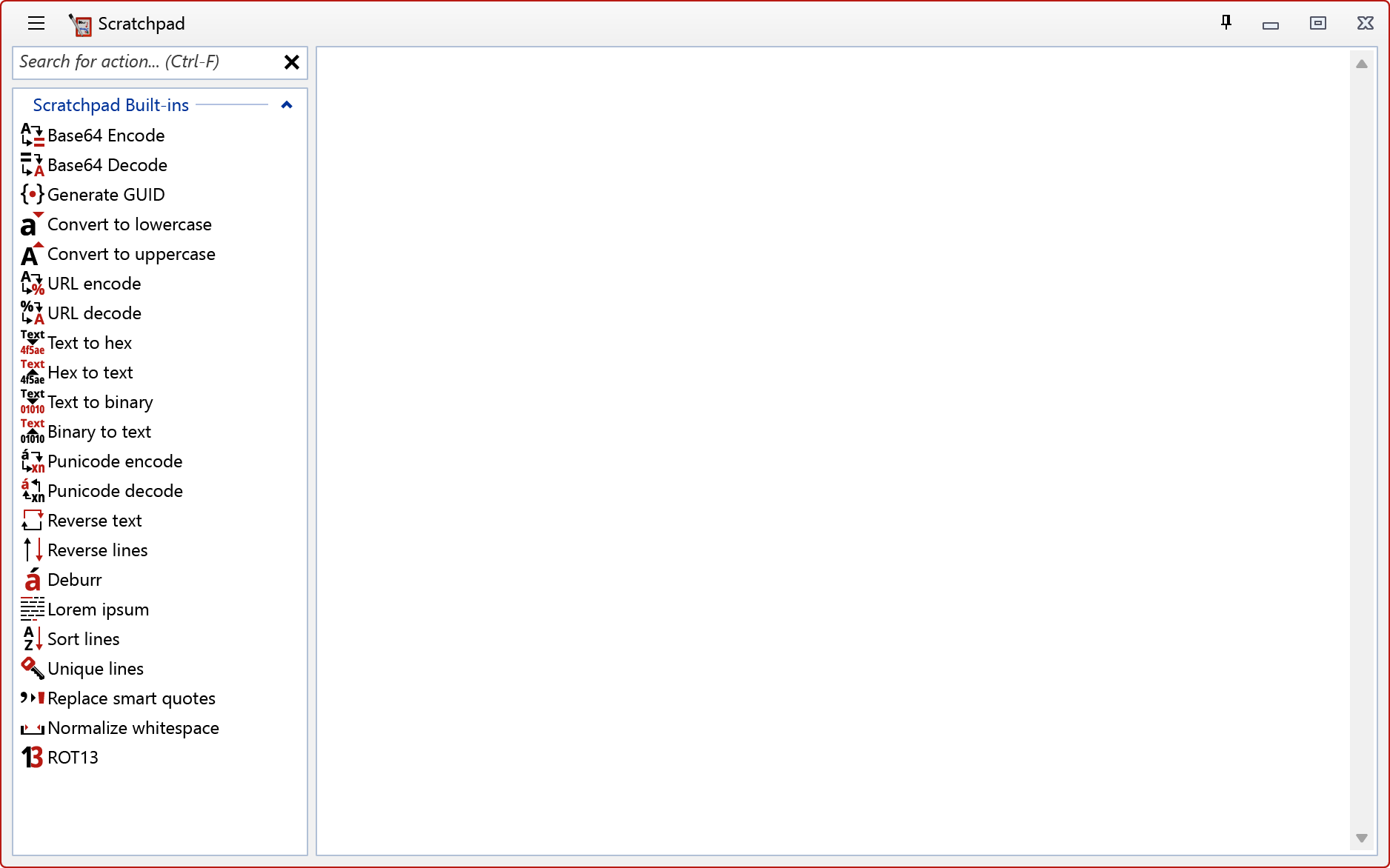
Scratchpad offers a wide variety of generators and transformers for you to choose from.
Extensible
The defaults don't fit your needs? Extend Scratchpad with community plugins – or write your own!
Fast & native
Because Scratchpad is a native Windows application, it feels fast and responsive to use.
Offline
Everything you enter into Scratchpad stays on your machine1, and it even works without an internet connection2.
Flexible out of the box
Scratchpad ships with a powerful collection of 29 built-in text generators, encoders, decoders, and cleanup tools.
Extensible by design
The functionality of Scratchpad can be extended using plugins. Creating plugins is easy – it's just a .NET class library. Below is a simple example for a plugin that provides a Pig Latin transformation. For more details see the plugin documentation.
 1using System;
 2using System.Collections.Generic;
 3using System.Text;
 4using Sawblade.Scratchpad.PluginAPI;
 5
 6namespace MyScratchpadPlugin
 7{
 8    public class Plugin : IPlugin
 9    {
10        public string ID => "com.example.scratchpadplugin";
11
12        public string Name => "Example Plugin";
13
14        public (string Name, string URL) Author => ("Your Name Here", "https://example.com/");
15
16        public IEnumerable<IAction> ProvidedActions => [
17            new PigLatinTransformation(),
18        ];
19    }
20}
 1using System;
 2using System.Linq;
 3using System.Drawing;
 4using Sawblade.Scratchpad.PluginAPI;
 5
 6namespace MyScratchpadPlugin
 7{
 8    public class PigLatinTransformation : ITransformation
 9    {
10        static string[] vowels = [ 'a', 'e', 'i', 'o', 'u', 'A', 'E', 'I', 'O', 'U' ];
11
12        public string LocalID => "piglatin";
13
14        public string Name => "Pig latin";
15
16        public string Description => "Convert sentences into pig latin";
17
18        public Bitmap? Icon => null;
19
20        public string Transform(string @string)
21        {
22            if (string.IsNullOrWhiteSpace(@string))
23                return string.Empty;
24
25            return string.Join(" ", @string.Split(' ').Select(w =>
26            {
27                if (string.IsNullOrEmpty(w))
28                    return "";
29
30                // Check for starting vowel
31                if ("aeiouAEIOU".Contains(w[0]))
32                    return w + "way";
33
34                // Find standard vowel index
35                int idx = w.IndexOfAny(vowels);
36
37                // Handle "qu" exception
38                if (idx > 0 && char.ToLower(w[idx]) == 'u' && char.ToLower(w[idx - 1]) == 'q')
39                    ++idx;
40
41                // Fallback to 'y' if no standard vowels exist
42                if (idx <= 0)
43                    idx = w.IndexOfAny(new[] { 'y', 'Y' });
44
45                if (idx <= 0)
46                    return w + "ay";
47
48                // Shift consonants and check for TitleCase capitalization
49                string res = w[idx..] + w[..idx] + "ay";
50                return char.IsUpper(w[0])
51                    ? char.ToUpper(res[0]) + res[1..].ToLower()
52                    : res;
53            }));
54        }
55    }
56}
Download Scratchpad
Give Scratchpad a try for yourself. You'll love it!
Version 1.1.1
Published Sunday, September 13th 2026, 10:23 AM
This is a hotfix release that addresses an issue where the setup wizard was missing important files, which could result in Scratchpad crashing unexpectedly.
System requirements
Windows 7 SP1 or later (Windows 11 recommended)
Microsoft .NET 10 Desktop Runtime
30 MiB free disk space
FAQs
Is Scratchpad free to use?
If Scratchpad is really free to use, where is the catch?
Does Scratchpad work offline?
Is Scratchpad vibe coded?
Is there commercial support available for Scratchpad?
What technology does Scratchpad use?
Can I read the End User License Agreement (EULA) before I download the application?
I have a problem with Scratchpad! How do I report it?
2: Scratchpad can optionally utilize an internet connection to check for application updates.
Windows® is a registered trademark of Microsoft Corporation.